TL;DR: putting company email on phones is the step where sovereignty quietly slips away without anyone deciding it should. We wrote a mobile app that talks to your own ERP and nothing else: it never sees your password, its notifications go through neither Google nor Firebase, and mail lands in seconds instead of five minutes.
In this article
- The link nobody looks at: the server gets chosen, the workstation gets issued, the phone's mail app installs itself.
- What Microsoft writes about its own mobile client: on an on-premises Exchange with basic authentication, the encrypted password is kept inside the service.
- The other pipe, the notification one: even with a perfectly sovereign server, the notification goes through Google by default.
- What we put on the phone: Symbifox Comms talks only to your Odoo, a single mailbox that the phone is a window onto.
- A sign-in that never sees your password: sign-in happens on your own Odoo page, with no password route in the app at all.
- Notifications that don't go through Google: UnifiedPush lets you pick the relay, and that relay can be your own.
- Mail arrives in seconds, not in five minutes: with IDLE, mail shows up in two to seventeen seconds instead of five minutes.
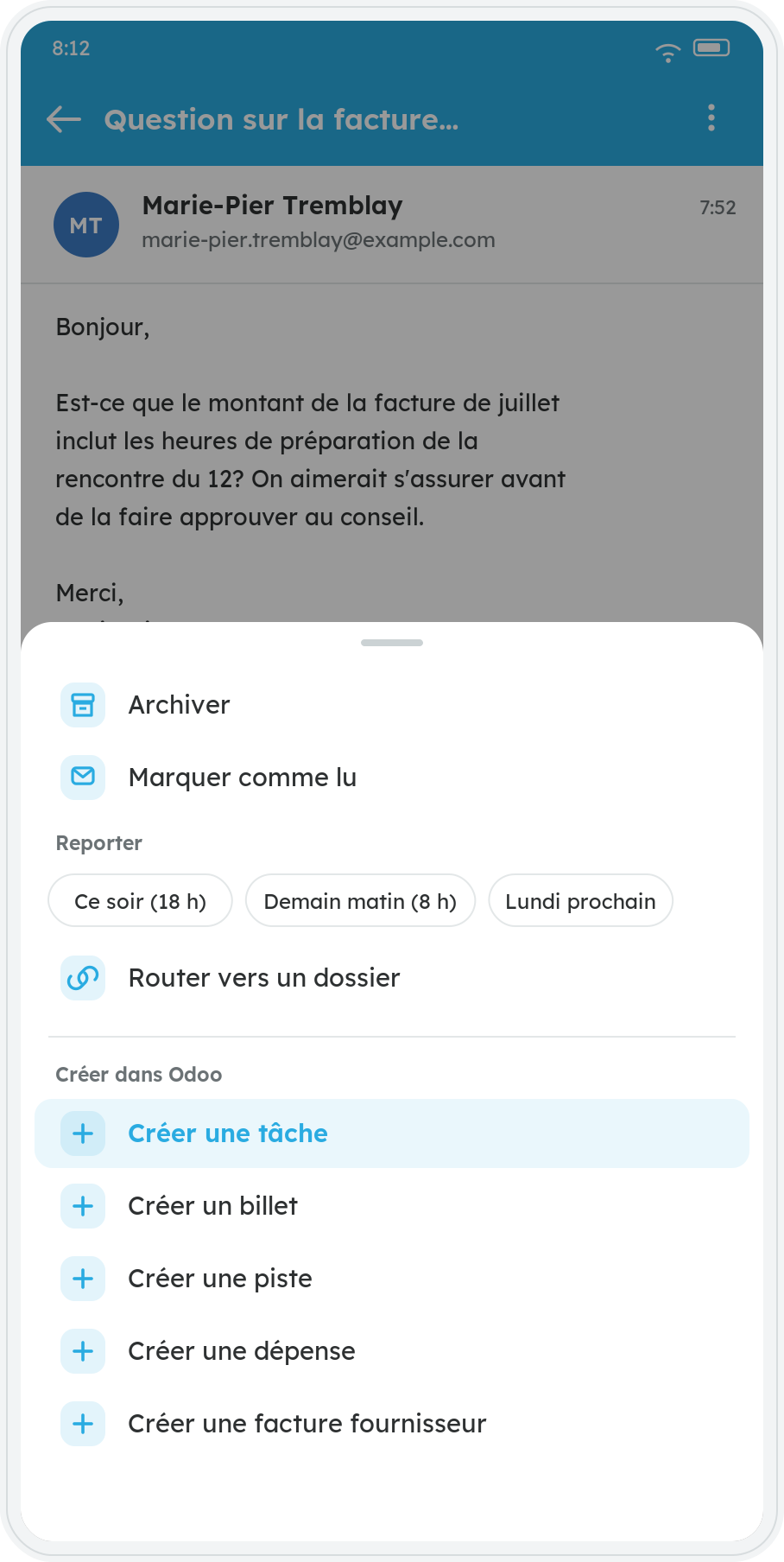
- Filing from the phone, not just reading: an email becomes a task, a ticket or a supplier bill without waiting for the trip back.
- What we capped, and why: fifty recipients and a hundred sends an hour, to bound what a stolen token can do before anyone notices.
- The same three questions, three setups: the table comparing Outlook on Microsoft 365, Outlook on an on-premises Exchange and Symbifox Comms.
- The Law 25 angle: an email subject line is personal information, and the relay that carries it lives somewhere.
- The trade-offs: Android only, no public store, and no per-device revocation yet.
A diligent SMB picks its hosting carefully. It asks where the data lives, it reads the contract, it turns down two providers because their servers sit elsewhere. Then, on a Tuesday morning between two meetings, somebody installs the mail app they already know on their phone. Three weeks later, twelve business mailboxes are travelling through a route nobody ever examined.
This isn't carelessness. The phone always comes last in a project, usually after go-live, and it comes in through the side door: an employee who simply wants to answer the client faster.
The link nobody looks at
The company chooses the server. It supplies the workstation. The mail app on the phone is almost always chosen by the employee, alone, in thirty seconds. It is the one piece of the chain nobody has a map of.
Three questions come up at that exact moment, and they are almost never asked. Where is the mail kept once it leaves your server? Who sees the notification that makes the phone buzz? And what happens, precisely, the day that person walks out with the device in their pocket?
What Microsoft writes about its own mobile client
Let's start by being fair: in the most common case, a Microsoft 365 mailbox with modern authentication, Microsoft's own documentation is reassuring and verifiable. It says no mailbox data is cached outside Microsoft 365, that the data stays in its mailbox, and that at no time does the service have access to the user's password. On that scenario, there is no case to make.
The picture changes when the mail server is yours. For an on-premises Exchange connected with basic authentication, Microsoft describes a completely different route in plain language: the username, the password and a key specific to the device travel from the phone to the Outlook cloud service, the key encrypts the password, and the encrypted password is then stored in the service. From then on it is that service, not the phone, that connects to your server to fetch and cache the contents of the mailbox.
The most useful passage on that page isn't technical, it's the warning Microsoft addresses to its own customers: transmitting passwords to that architecture might make you unable to meet the requirements of PCI-DSS or ISO/IEC 27001, and synchronising mail and calendars raises a GDPR compliance question.
The same page opens the exit door itself: it states up front that Outlook supports hybrid modern authentication for a mailbox hosted on your premises, which removes the need for basic authentication, and with it this entire route. So the problem is not a well-kept secret. It is an architecture decision somebody has to make, and that almost nobody makes, because it plays out at the moment an employee installs an app on their phone.
The lesson isn't "Microsoft is at fault". It's that where your server lives does not, on its own, decide the route your mail takes. The mobile client decides a good part of the trip.
The other pipe, the notification one
Now assume a perfectly sovereign server, yours, in Quebec, and a mobile client that fetches mail directly with nothing in between. One pipe is left, the one everybody forgets: the notification.
On Android, the normal route runs through Firebase Cloud Messaging, Google's service, which requires Google Play Services on the device. The F-Droid project puts it bluntly: relying on Google-provided push notifications is a concern for privacy as much as for independence, and the Firebase library, being closed, cannot even be included in a free software app.
What that pipe carries varies from one app to the next, but at a minimum it carries the existence of the message: that an email arrived, at what time, for whom. Often the sender and the subject too. On a business mailbox, the subject line of an email already says a great deal.
What we put on the phone
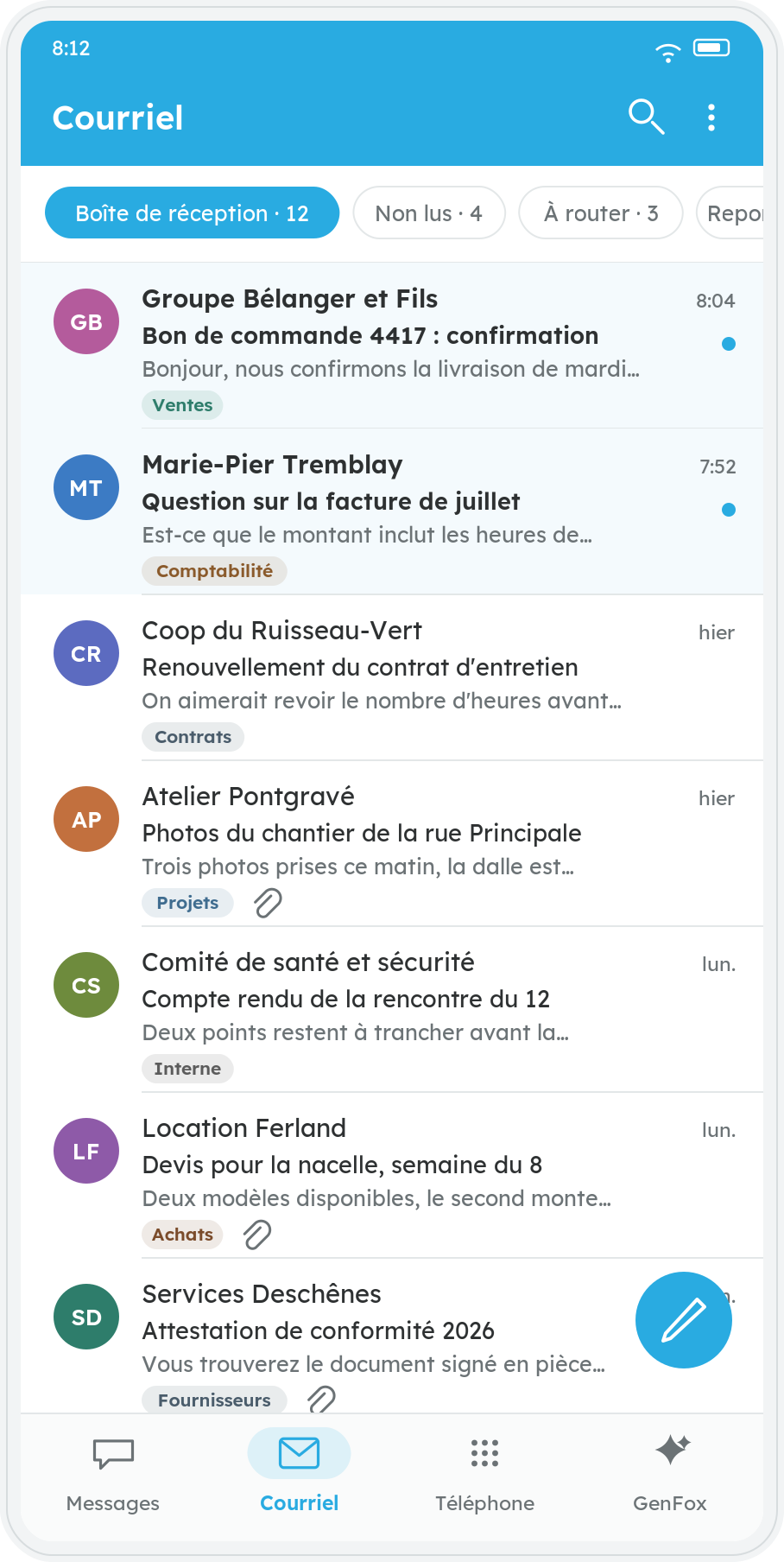
The app is called Symbifox Comms. It runs on Android 8 and later and it talks to exactly one thing: your Odoo instance. Along the bottom, up to four tabs depending on what the instance carries: text messages, email, a dialpad wired to your phone system, and the assistant. Email is the one this article is about. The other three each deserve their own.
What you do in it is what you expect from a mail client. Read, reply, reply-all, forward, compose, with attachments. Archive a message or snooze it to tomorrow morning, with a few seconds to undo the gesture if a finger slipped. Swipe gestures and quick-action buttons are configurable. There is an offline cache, so a subway tunnel doesn't empty the screen. And the interface colours are those of the instance it connects to, not those of a product.
The real difference is elsewhere, and it fits in one sentence: this is not a mail client wired to a mail server, it is your ERP in your pocket. The mailbox on screen is the one from Odoo's email module, with its folders, its categories, its rules and the link to the client's record. So triage, filing and routing happen on the server, not on the phone. The rules you wrote at your desk apply to mail arriving while you're on the bus, and an email handled on the bus is handled for everyone. There aren't two mailboxes trying to sync with each other: there is one, and the phone is a window onto it.
A sign-in that never sees your password
On first launch the app asks for your instance address, then opens your own Odoo login page in the phone's browser. It looks like a minor detail and it settles a great deal at once: your password, your single sign-on and your second factor all apply as they are, because it is the real login page. The app has nothing to reimplement, so it has nothing to reimplement badly.
What comes back from that page is not a password and it is not a token. It is a one-time code, valid for three minutes, and a separate request exchanges it for the real token. If you already run single sign-on for everything else, the phone inherits it with no extra setup.
There is no password route in the app at all. That is deliberate, and the reason is simple: a door that accepts passwords is a door that can be probed, and it then has to be armoured with rate limits and deliberately vague error messages so it stops telling an attacker what it knows. Not opening that door gives the same protection with nothing to tune.
Then there is an employee leaving. That is the real test. A token lives on a phone and does not expire on its own. The Symbifox Comms token stops working the moment that person's Odoo account is deactivated, including if it is merely downgraded to portal access. Deactivating the account is the one gesture everybody actually performs when someone leaves, so that is the one we wired it to.
Notifications that don't go through Google
For notifications, the app uses UnifiedPush. It is an open standard whose principle fits in one sentence: the user chooses the service their notifications travel through, not the app's author. You install a small program called a distributor, it holds a single connection on behalf of every compatible app, and it relays.
The most widespread distributor is called ntfy. It is free software, it works without an account, and it can be hosted on your own server if you want even the relay to stay in-house. Neither Google Play Services nor Firebase is required. The app therefore also works on an Android phone built without Google's services.
One clarification belongs here, because this is the spot where it would be easy to claim too much. The notification we send is no thinner than anyone else's: it carries the sender's name, the subject, and the opening of the message, the last two cut at a hundred and eighty characters. That is what it takes to decide whether the phone is worth pulling out of a pocket, and it is exactly what every other mail app carries.
What changes is not the content, it is the relay. With Firebase, the relay is Google and you don't get to choose it. Here, the relay is the one you installed, and it can be yours: ntfy runs perfectly well on your own server, in which case the sender's name and the subject never leave your infrastructure. If you stay on ntfy's public service, they travel through it. That is a choice, it is made knowingly, and it changes by changing one address.
One exception along the way: when more than five messages arrive in the same wave, a single summary notification goes out, and that one names nobody. It says how many there are, nothing else. It saves the phone from ringing a hundred times during a meeting, and it settles the worst case in one move, the first connection that pulls down an entire mailbox.
Mail arrives in seconds, not in five minutes
Until this summer the module polled the mailboxes every five minutes. On a workstation that is bearable. On a phone, five minutes of waiting for a client's email is an eternity. It is even the complaint most often levelled at slow-waking mail clients.
The fix has existed since 1997 and is described in a public standard: instead of asking "anything new?" every five minutes, you leave a conversation open with the mail server and ask it to speak up as soon as something happens. It is called IDLE, virtually every mail server speaks it, and nobody uses it enough.
So a small watcher holds one of those open conversations for each connected mailbox and tells Odoo the moment a delivery is announced. Measured on real emails: two seconds and seventeen seconds between sending and the message appearing, against up to five minutes before. The watcher reads no message, moves none, deletes none and carries none. It says "there's something new". That is all it knows how to say.
A watcher is a thing that falls over. This one is an accelerator and nothing else: if it dies, jams or loses the network, the regular pass keeps its schedule and the reconciliation re-sweeps the history. You lose latency, never an email. That is also what makes it treacherous to run, because nothing breaks and so nothing complains: it has to be monitored for its own sake, otherwise real time can have been dead for three weeks with nobody noticing.
There is a side effect we hadn't planned for and that turned out to be the most appreciated: the inbox left open on the desktop refreshes itself. An email archived from a phone in a waiting room disappears from the office screen without anyone reloading anything. It works both ways: the notification still sitting on the phone clears itself when the email is handled from the desk.
Filing from the phone, not just reading
An ordinary mail client lets you read and reply. That is already something, but it leaves all the filing for when you get back to your desk, which is to say forever.
Here, an email can go and sit in the record of the client it belongs to, or become a task, a support ticket, a lead, a vendor bill or an expense, straight from the phone, keeping its conversation thread and its attachments. A client request read in a parking lot becomes an assigned task before you have started the car.
Offline mode deserves a sentence, because the dangerous case is not the one you'd expect. It isn't "the send failed": it's "the send succeeded and the answer got lost". The phone cannot tell those two apart, so it retries, and the client receives the same message twice. On client correspondence that is not a cosmetic defect. So we added an identifier generated before the first attempt and reused on every retry: the database refuses the duplicate, and the second send does nothing at all.
What we capped, and why
Access control says who is allowed to do what. It never says how many times. That is an abstract distinction right up until the day a token ends up in someone else's hands, or a bug in the app starts looping.
| The cap | Its value | Why it exists |
|---|---|---|
| Recipients per send | 50 | "Reply all" on a sixty-person thread is one finger away on a phone, and that gesture cannot be recalled. |
| Rows per bulk action | 100 | Archiving changes more than a display: the message also moves on the mail server. |
| Sends per hour per device | 100 | It does not prevent a token being stolen. It bounds what can go out before somebody notices, and it keeps your domain off the blocklists. |
| Attachment size | 25 MB | Past that, the phone is neither the right pipe nor the right screen: the file stays on the server, where it already is. |
In the same spirit, remote images in an email are blocked until you ask for them. The invisible pixel that newsletters tuck into their images will therefore not learn what time you opened the message, or from where.
Four questions worth asking before putting company email on phones, whichever tool you pick:
- Is the mail cached anywhere other than our server, and if so, where?
- Which service does the notification travel through, and what does it carry?
- What action, on our side, cuts off a device's access? And have we ever tried it?
- How many emails can a single device send in one hour before something stops it?
The same three questions, three setups
The three questions from the start are not rhetorical. They have answers, and the answers differ depending on what was installed on the phone. The two middle columns come from Microsoft's documentation, except for the notification row, which describes normal Android behaviour.
| The question | Outlook mobile on Microsoft 365 | Outlook mobile on an on-premises Exchange, basic authentication | Symbifox Comms on your Odoo |
|---|---|---|---|
| Where is the mail kept? | In the mailbox, with no copy outside Microsoft 365 | Cached in the Outlook cloud service | On your server. The phone keeps only an offline reading copy |
| Who sees the password? | Nobody: modern authentication returns a token | The service, which keeps an encrypted copy of it | Nobody: sign-in happens on your Odoo page, and the app has no password route |
| Which route does the notification take? | The normal Android route, Google's | The normal Android route, Google's | The relay you chose, yours if you want it |
| What action cuts off access? | Each connection is a device in the admin console and is managed there | Uninstall by the user, or blocking the app. Data leaves the service within three to seven days | Deactivating the Odoo account, effective immediately |
None of these columns is disqualifying on its own. The middle one is the only one that genuinely surprises the people we show it to, and it is precisely the setup of a company that went to the trouble of keeping its server in-house.
The Law 25 angle
A business email contains personal information: a name, an address, a phone number, sometimes a medical file or a bank statement as an attachment. Since September 2023, before communicating personal information outside Quebec, an organisation must carry out a privacy impact assessment.
A mobile client that caches your mail elsewhere, or routes the notification through a third party, walks straight into that conversation. This is not a reason to refuse everything: it is a reason to be able to answer the question the day it gets asked, by a client, by an insurer or by the Commission.
The notification is where that question comes up most quietly, because it doesn't look like a communication: nobody thinks of themselves as exporting personal information by making a phone buzz. A sender's name and an email's subject line are personal information all the same, and the relay carrying them sits somewhere. Knowing where, and being able to move it in-house, is what turns an awkward question into a one-line answer.
The trade-offs
The app is Android only, from version 8 up. There is no iOS version, and none planned in the near term.
It isn't downloaded from a public store: we install it with you, on your team's devices. That is a real constraint, not a selling point.
Notifications require installing a distributor, so a second app on the phone. That is the price of not depending on Google, and it is paid once, at install time.
That distributor also points at the ntfy project's public service by default. Until it is repointed at a relay of your own, the sender's name and the subject of your mail travel through a third party, as they do elsewhere. Moving the relay in-house comes down to changing one address, but it doesn't happen by itself.
There is no screen yet that lists the connected phones and lets you revoke a single one. The action that cuts off access is deactivating the account, and it cuts off every device that person has at once. For a departure that is exactly what you want. For a phone lost by someone who is staying on the team, it is broader than necessary.
IMAP access also has to be open on your mailboxes, which some business accounts disable by internal policy. It is the same condition as for the desktop inbox, of which the app is an extension rather than a separate product.
Finally, it is not a bulk-sending tool. For a newsletter, you need a newsletter tool.
At Blue Fox
This app is part of Symbifox, the set we deploy for our clients. We put it in place alongside the email module, we connect your existing mailboxes without changing provider, and we set up the team's phones at the same time.
If your business email currently lives in an app chosen by each employee, the first exercise costs nothing: write down the list of mail apps installed on your team's phones. The list is almost always longer than expected. Let's talk about your phones once you have it in front of you.
Sources
- UnifiedPush : the open notification standard, and the principle that the user picks their distributor
- F-Droid, "UnifiedPush: a decentralized, open-source push notification protocol" : why depending on Firebase is a privacy and independence problem
- ntfy : the most widespread UnifiedPush distributor, free software and self-hostable
- Microsoft, "Passwords and security in Outlook for iOS and Android" : the encrypted password stored in the service, and Microsoft's own warning about PCI-DSS, ISO/IEC 27001 and GDPR
- Microsoft, "Outlook for iOS and Android in Exchange Online" : the Microsoft 365 case, where data stays in the mailbox and the service never sees the password
- RFC 2177 : the IDLE command, published in June 1997
- RFC 9051 : the IMAP standard, the one the module uses to connect to your mailboxes
- Commission d'accès à l'information, main changes brought by Law 25 : the privacy impact assessment required before any communication outside Quebec, in force since September 2023 (page in French)