One column for the prospect's name, one for the phone number, one for "last contact", and one for "status" with colour codes that only the person who created it truly understands. That, roughly, is the makeup of the "starting point" for many businesses when the time comes to consider adopting a CRM.
The problem isn't Excel itself. It's that a shared file on a server (or worse, on someone's desktop) doesn't follow up with anyone. It doesn't remind you that a prospect has been waiting for a callback for two weeks. It doesn't show you at a glance where this month's sales stand.
Odoo Community's CRM module is exactly what fixes that: a structured, visual tool integrated with the rest of your operations, available with no licence fees.
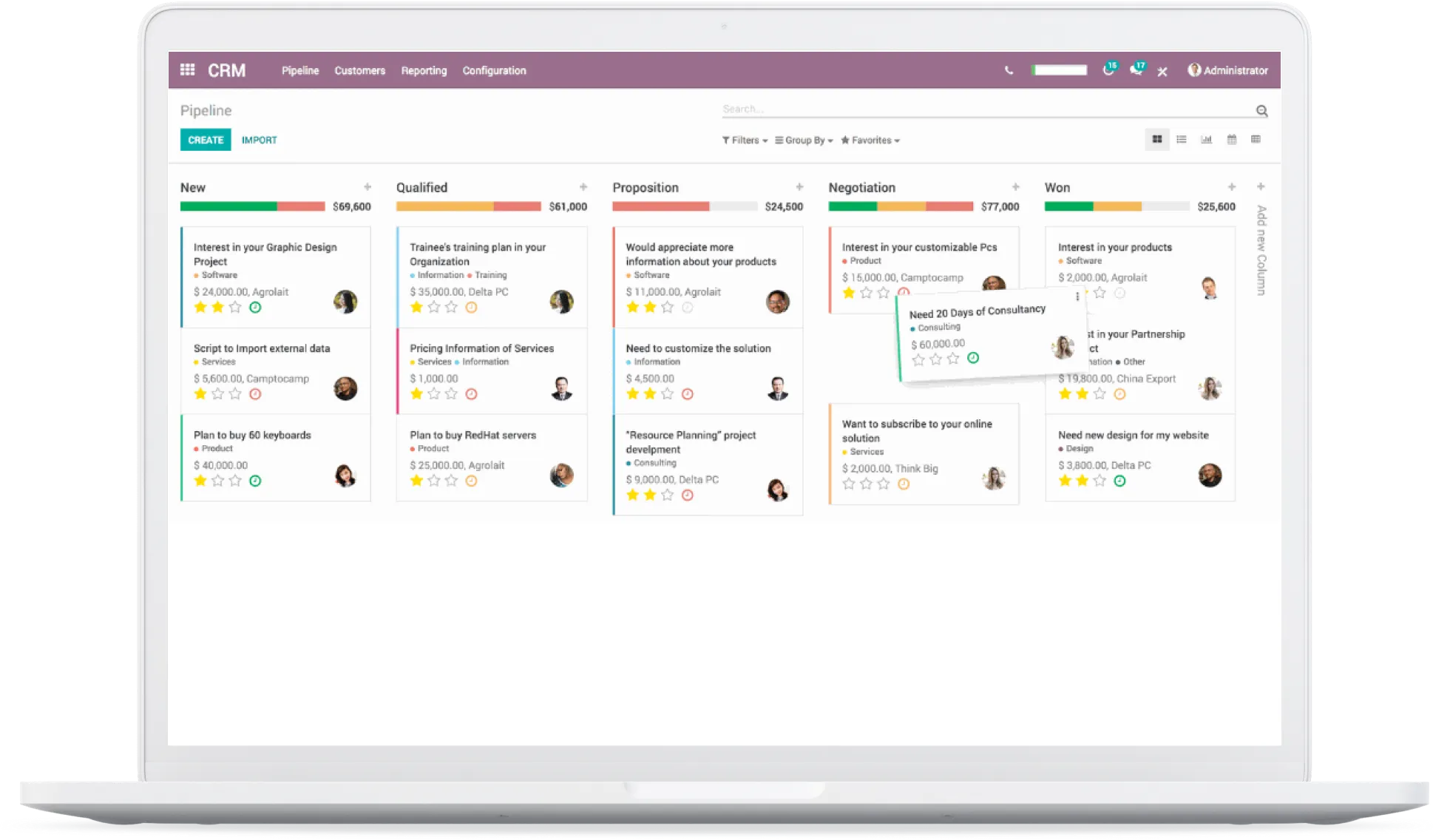
The pipeline: see where your sales stand at a glance
The first thing you see when you open Odoo's CRM is the kanban pipeline. Each opportunity is a card you drag from one stage to another: New, Qualified, Proposal, Negotiation, Won.
The stages are fully customizable. A professional services firm doesn't have the same sales cycle as a distributor: you adapt the columns to match your business reality. Each stage shows the total expected revenue, giving you an instant view of in-progress sales.
Drag and drop works exactly as you'd expect. Grab a card, slide it to the next stage. No dropdown menus, no forms to fill out: it's smooth.
Activities: follow-ups that don't fall through the cracks
This is probably the feature that changes the game the most compared to Excel. Each opportunity can have scheduled activities: a call to make, an email to send, a meeting to prepare.
Odoo displays these activities right on the kanban card with colour coding: green for upcoming, orange for today, red for overdue. Impossible to forget a follow-up.
You can schedule an activity in two clicks from any opportunity. The system offers predefined types (call, email, meeting, to-do) and you can create others as needed. Once the activity is done, you mark it complete and schedule a new one right away.
For a sales team, this means the manager can see in real time who has overdue follow-ups, who has too many opportunities with no scheduled activity, and where they need to step in.
Prospect tracking: from first contact to the sale
Each opportunity record in Odoo CRM is a complete file. You'll find contact information, expected revenue, probability of success, expected close date, and the full history of interactions in the chatter (the built-in discussion thread).
Prospects can come from multiple sources: manual entry, file import, web form on your Odoo website, or a dedicated email alias. For example, you can set up a sales@yourdomain.com alias that automatically creates an opportunity in the pipeline for every incoming email.
The module also handles the distinction between leads (unqualified prospects) and opportunities (qualified prospects). You can enable or disable this distinction depending on how complex your sales process is.
Integration with other modules: where Odoo stands out
The real advantage of a CRM built into an ERP is that information flows. When an opportunity is won, you can generate a quote directly from the record without re-entering any data. The approved quote becomes a sales order, which generates an invoice.
In Community, the CRM integrates natively with:
| Module | CRM Integration |
|---|---|
| Sales | Create a quote from a won opportunity |
| Invoicing | Track invoices linked to converted opportunities |
| Contacts | Shared contact database across all modules |
| Calendar | Schedule meetings linked to opportunities |
| Send and receive emails from the opportunity record | |
| Expenses | Track costs related to customer acquisition |
It's this integration that makes the difference compared to a standalone CRM. No need to copy-paste data between three different tools.
Excel vs Odoo CRM: the real comparison
To be fair, let's put them side by side:
| Criteria | Excel Spreadsheet | Odoo CRM Community |
|---|---|---|
| Cost | Microsoft 365 licence (already paid for) | Free (self-hosted) |
| Pipeline view | Manual (filters, colours) | Native kanban, drag and drop |
| Automatic follow-ups | None | Scheduled activities with reminders |
| Interaction history | None (buried in emails) | Built-in chatter per opportunity |
| Reports | Pivot tables | Built-in, customizable reports |
| Multi-user access | Frequent conflicts | Native, with access rights |
| Quote/invoice integration | None | Native with Sales and Invoicing modules |
| Learning curve | Low (everyone knows Excel) | Moderate (intuitive interface, but it's a new system) |
Excel has a real advantage: everyone already knows it. But as soon as a team grows past two or three people, or the sales cycle takes more than a week, the limitations become obvious.
Reports and forecasting
Odoo Community's CRM includes built-in reporting tools. You can analyze the pipeline by salesperson, by stage, by period, and cross-reference these dimensions to get a clear picture of sales performance.
Standard reports include pipeline analysis (expected revenue by stage), conversion rates, and activity tracking by team member. You can also create custom views with filters and groupings.
For sales forecasting, the Community version offers the basics: expected revenue per opportunity, expected close date, and probability of success. It's not machine learning, but it's enough to plan the quarter.
Community vs Enterprise: what's missing (and what isn't)
Let's be honest: Odoo's Community CRM covers the essentials, but some advanced features are reserved for the Enterprise edition. Here's the picture:
| Feature | Community | Enterprise |
|---|---|---|
| Kanban pipeline | Yes | Yes |
| Activities and follow-ups | Yes | Yes |
| Email integration | Yes | Yes |
| Reports and analytics | Yes (basic) | Yes (advanced + dashboards) |
| Predictive scoring (AI) | No | Yes |
| Automated prospecting (lead mining) | No | Yes (in-app purchase) |
| Lead enrichment | No | Yes (in-app purchase) |
| Built-in VoIP | No | Yes |
| Native mobile app | No | Yes |
| Odoo Studio (no-code customization) | No | Yes |
In practice, if your team needs to qualify hundreds of leads per day with automated scoring, Enterprise has a real edge. But for an SMB with a standard sales cycle and a team of 2 to 15 salespeople, Community does the job and then some.
Predictive scoring, for example, is relevant when you generate a high volume of inbound leads and need to prioritize. If your team handles 10 to 50 new leads per month, a well-structured manual qualification process is often more effective than an algorithm.
Where the module reaches its limits
Transparency matters. Here's what you need to know before jumping in:
No native mobile app. In Community, you access Odoo through the phone's browser. It works (the interface is responsive), but it's not as smooth as a dedicated app. For a salesperson on the road, it's a trade-off.
Dashboards are limited. Enterprise offers configurable visual dashboards. In Community, you get by with report views and saved filters, but it's less "ready to consume".
Hosting is your responsibility. Community is self-hosted. You need a server, updates, backups. That's the price of freedom: you control everything, but you manage everything.
Advanced customization requires development. Without Odoo Studio (Enterprise), any form or workflow change goes through Python/XML code. The modules from theOCA (Odoo Community Association) fill a lot of gaps, but you need to know how to install and configure them.
Hosting and maintaining Odoo Community is our specialty. Servers in Quebec, automated backups, managed updates. We handle the infrastructure so you can focus on your sales. Let's talk?
In practice with our clients
At Blue Fox, we deploy Odoo Community by default. It's our choice: 100% open-source software, hosted on servers we control, with full access to the source code and data. No lock-in, no billing surprises when the team grows.
For CRM specifically, we've found that the Community version covers the needs of the vast majority of SMBs and non-profits we work with. The visual pipeline, follow-up activities, integration with quotes and invoicing: that's the core of what a sales team needs day to day.
When a specific need goes beyond what Community offers, we look at OCA modules first before considering Enterprise. And if Enterprise really is the best option for a client, we say so upfront.
Our recipe for a CRM that actually works:
- Map your actual sales cycle before configuring anything
- Set up a pipeline that reflects your stages, not the default template
- Train the team on activities: that's the key to consistent follow-ups
- Integrate email from day one to centralize interactions
- Start simple, add complexity only when the need is confirmed
When do we start?
If your prospect tracking still lives in an Excel spreadsheet (or worse, in someone's head), Odoo Community's CRM is probably the best first step. It's structured, it's visual, it's integrated, and it costs nothing in licence fees.
Let's talk about your situation and let's figure out together if it makes sense for your team.